
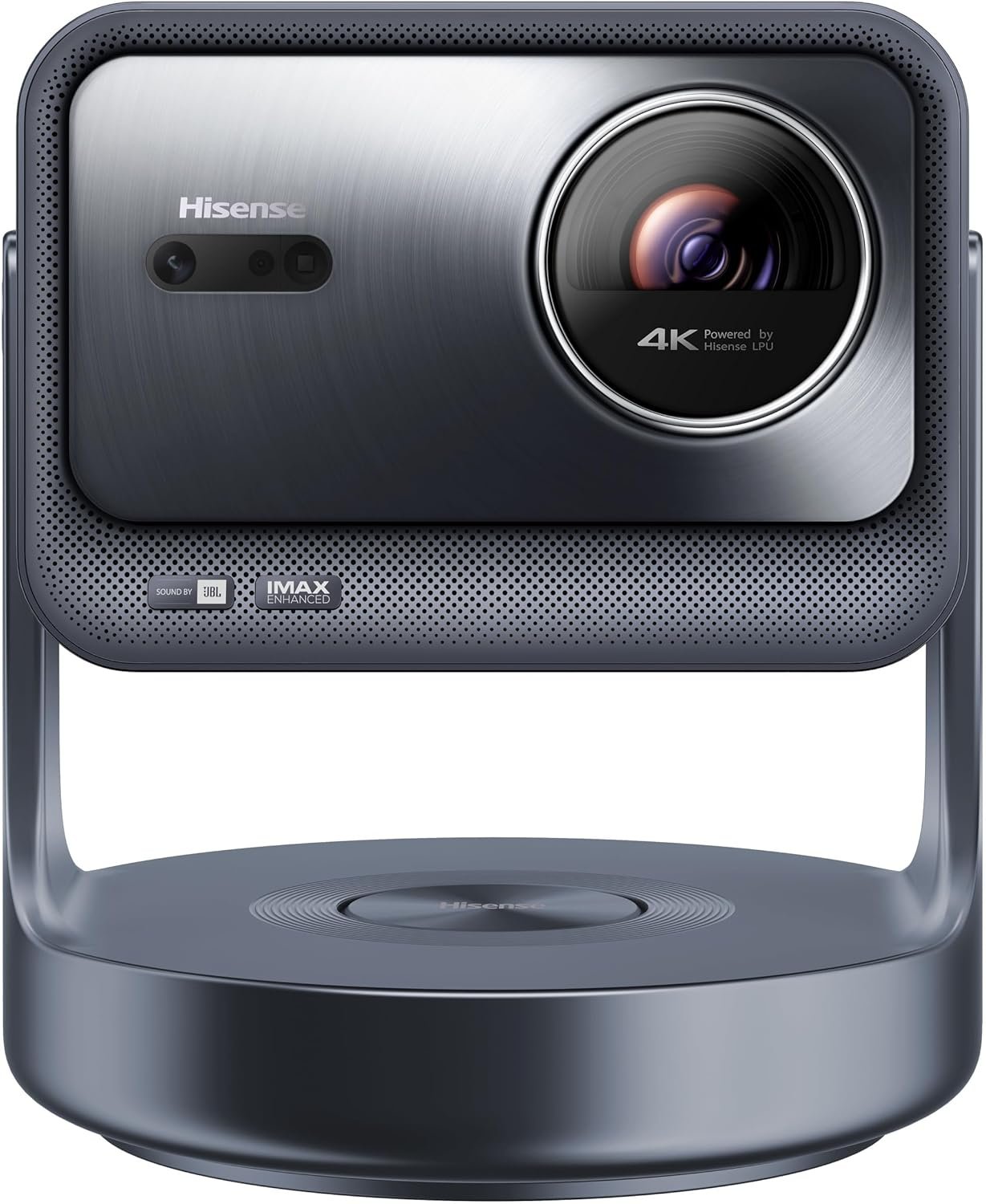
Hisense C2 Ultra, Triple Laser Smart Portable Projector, 4K UHD, 3,000 Lumens, 65” – 300”, Dolby Vision, IMAX Enhanced, Sound by JBL, Netflix Included, Designed for Xbox, Optical Zoom
$159.99
Related Products






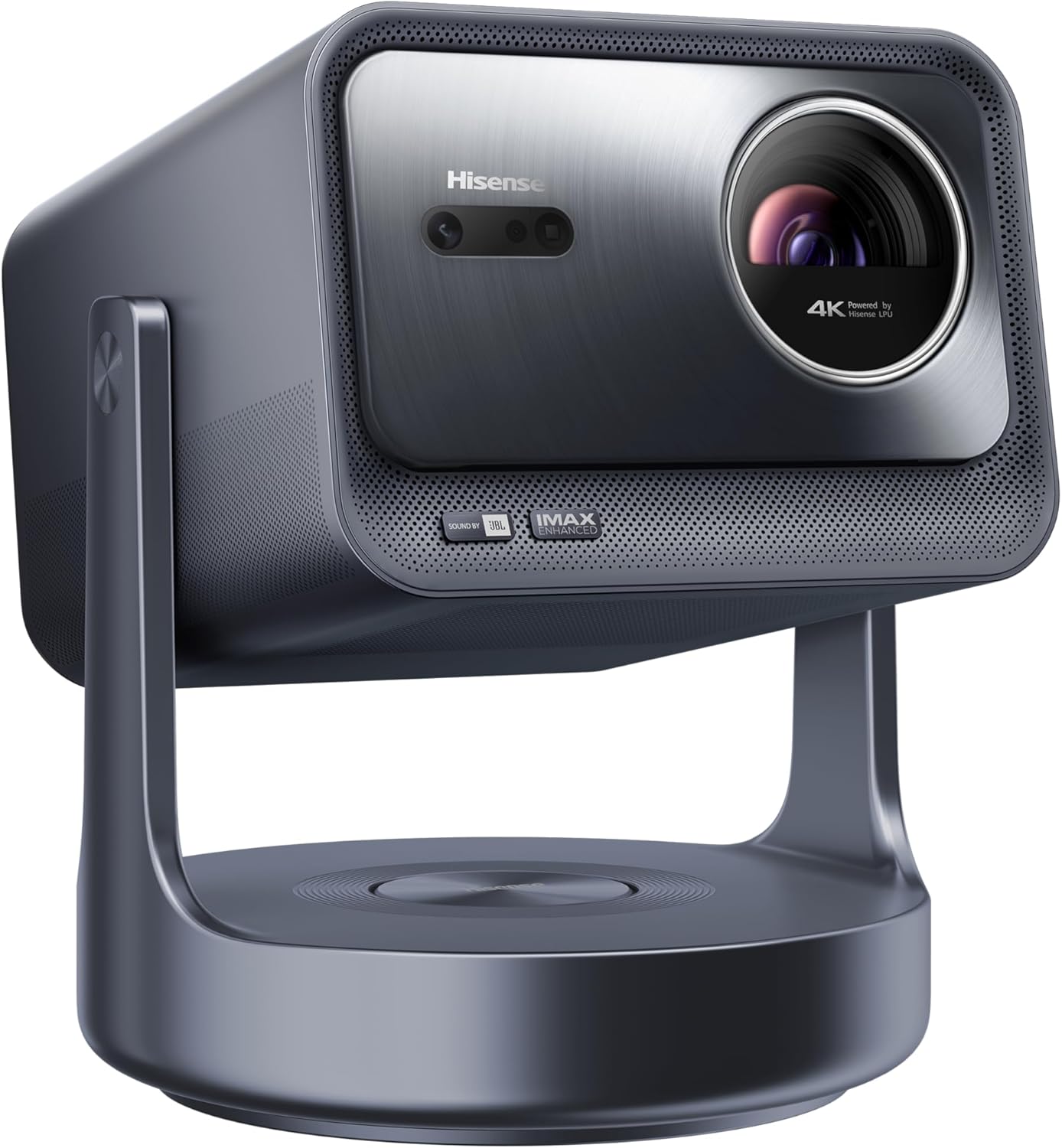


Get ready for movie night at your place! The C2 Ultra 4K Laser Mini Projector from Hisense is our most advanced pure tri-color laser yet. This means you’ll experience precise colors and no harmful rays of blue light. Enjoy vivid, action-packed footage just as filmmakers intended, right in your own home, with the support of IMAX Enhanced and Dolby Vision®. You can adjust your screen size from a cozy 65” to a sizable 300”. Plus, you can mount the projector on your wall or ceiling or leave it on the floor for flexible viewing, no matter your setup.
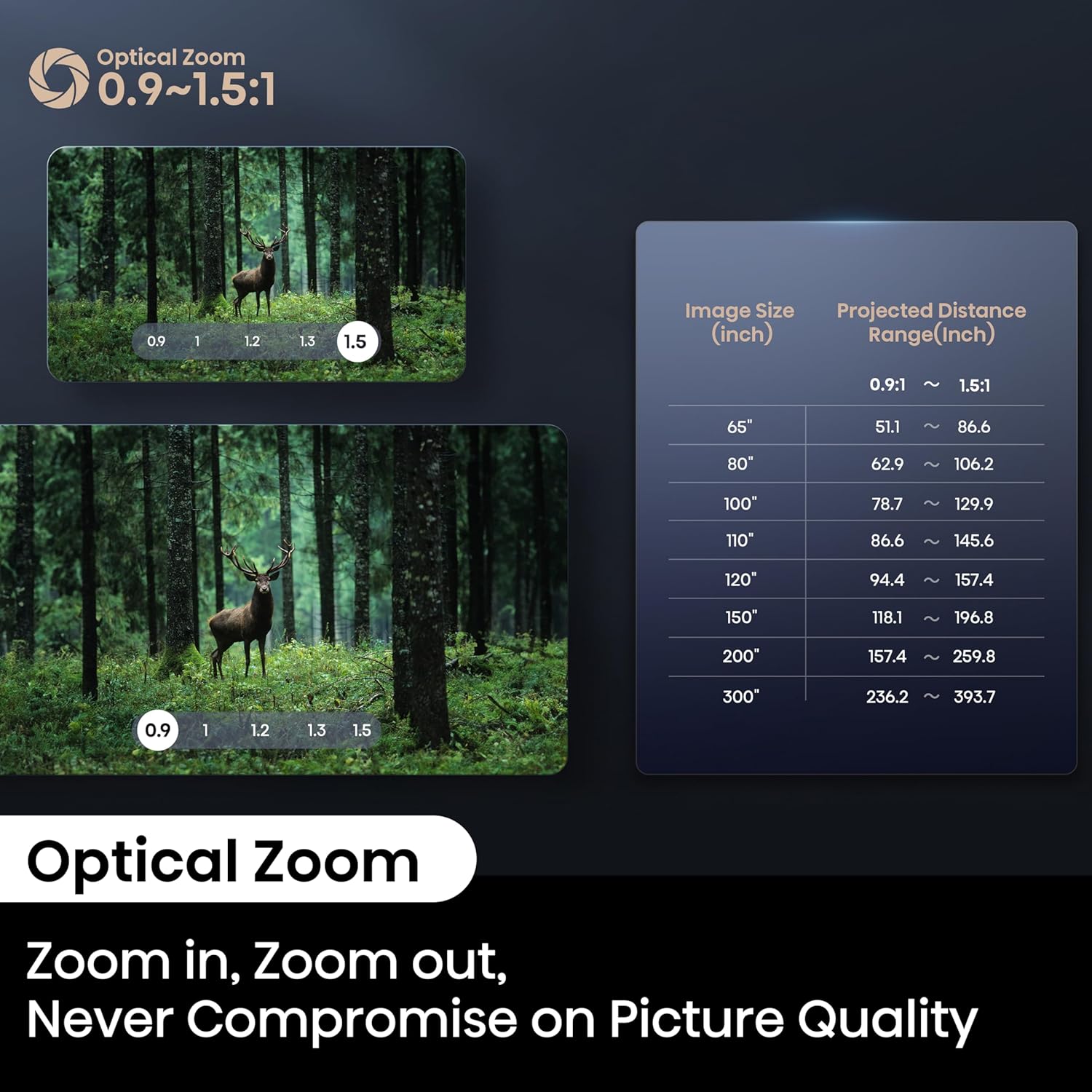
【65″-300″ Super Wide Projection Size】C2 Ultra supports screen sizes from 65” to 300”. Whether it’s a living room wall or an open backyard, enjoy flexible setup and a truly large display with minimal distance
【Angle Adjuster】C2 Ultra offers 360° horizontal rotation, 90° upward, and 45° downward tilt, giving you 135° of vertical adjustability. Easily switch between wall, screen, or ceiling projection without repositioning the base. Whether you’re sitting, lying down, or outdoors, the angle stays just right. Built with an all-metal body and seamless joints for stable, precise adjustments
【Optical Zoom 】C2 Ultra features a 1.67x optical zoom and a wide throw ratio of 0.9–1.5:1, allowing larger screens from shorter distances. Zoom in or out while maintaining full 4K resolution—no distortion, no brightness loss. Ideal for flexible setups in different room sizes without sacrificing image quality
【4K & 4K Upscaler 】Bring what’s on screen into crystal-clear focus. Its 4K AI Upscaler transforms beloved classics, home movies, broadcast TV and even streaming content into striking 4K quality. It’s amazing what can happen when every pixel works even harder
【Pure Triple Color Laser 】C2 Ultra uses an advanced triple laser light source that delivers richer colors and deeper detail than traditional LED projectors. With zero harmful blue light, it’s easier on your eyes—perfect for long movie nights or family use. Expect cleaner whites, fuller reds, and a more natural picture overall
【3000 ANSI Lumens Bright】C2 Ultra delivers 3000 ANSI lumens of peak brightness with a 2000:1 contrast ratio, ensuring vivid detail in both bright scenes and deep shadows. Whether it’s daytime viewing or a dark room, every frame stays sharp, vibrant, and clear—ideal for users seeking a high brightness 4K projector
【Super Wide Color Space, Super High Color Accuracy, 2000:1 Native Contrast】 110%BT.2020 super wide color brings whatever you’re watching to life in over a billion colors. Natural scenery, desert sands, grasslands…No matter what you watch on the C2, it’s always a feast for the eyes. With △E≈0.9 color accuracy and a native 2000:1 contrast ratio, every scene shows true-to-life tones and fine detail—perfect for users seeking precise color, high contrast, and wide color gamut in a 4K projector
【IMAX Enhanced, Dolby Vision】C2 Ultra is certified with both Dolby Vision and IMAX Enhanced, delivering studio-level color, contrast, and detail. Dark scenes stay sharp, bright scenes stay rich—just as the director intended. A true choice for users seeking a projector with real cinema quality at home
【240Hz Gaming 】C2 Ultra supports up to 240Hz refresh rate for ultra-smooth gameplay with zero stutter or motion blur. Perfect for fast-paced games and competitive play, it keeps every frame sharp and responsive—ideal for users looking for a high frame rate gaming projector
【Designed for Xbox 】C2 Ultra is designed for Xbox, automatically detecting game input and reducing latency for faster response. It delivers smooth, real-time control—ideal for console players looking for a projector built for Xbox performance
8 reviews for Hisense C2 Ultra, Triple Laser Smart Portable Projector, 4K UHD, 3,000 Lumens, 65” – 300”, Dolby Vision, IMAX Enhanced, Sound by JBL, Netflix Included, Designed for Xbox, Optical Zoom
Add a review

$159.99
WD –
Hisense C2 Ultra Review – A Welcome Upgrade Indeed in 2025
Hisense C2 Ultra Review & Settings SharedI bought the C2 Ultra to upgrade from the bang for the buck Viewsonic PX701-4K, which is an amazing offering in its price range but of course lacks HDR10+ as well as Dolby Vision content which is becoming more common. The C2 Ultra handles all modern formats and uses a true RGB laser configuration which is what lead me to this purchase.My theater is a dedicated, 150 inch 1.3 gain matte white screen darkened space with Roku and a Dolby Atmos setup so I can comment from that point of view and experience thus far. I did not buy it for portability, apps / OS or its sound system. There is zero ambient light to contend with in my theater. 3000 lumens is more than enough in here.The quick review is that right out of the box without any tweaks (you should tweak though) the difference was huge. Color is amazing without being over saturated. The sharpness of the image, including captioning text, is incredible. The auto-focus feature does what no human being could accomplish in any amount of time when it comes to perfecting the image, in about 20 seconds. Optical zoom and keystone were very simple to dial in also.Mounting: Ceiling mount, standard 1/4” adapter for lifestyle projectors. My setup required minimal keystone due to the height of my already installed screen. I installed mine at the maximum zoom distance which is about 17 feet back from the 150” screen. I wish it didn’t have speakers adding weight to it, but it mounted up fine after I used some good anchors.Setup: The theatrical standard for color temperature is 6500k, so I downloaded a Kelvin Meter app and tested it against LED bulbs and their claimed Kelvin values before using on my screen. I used a YouTube bright white video for reference. The closest modes were CINEMA NIGHT + color STANDARD but were still too cold (well over 7000k).I adjusted the WHITE BALANCE setting to BLUE GAIN -8 to achieve 6500k.I then used 20% and 50% grey YouTube videos to confirm 6500k was also translating to shadow content with this setting, so no offset was needed.I then pulled up a YouTube video with all primary and secondary colors displayed in gradient bars from black to full range and used the COLOR TUNER brightness adjustments for each to be sure the gradients were equal, and arrived at the following settings:Red 0, Green -2, Blue 0, Yellow -1, Cyan -3, Magenta +1This is a poor man’s setup but it translates as I watch movies I am familiar with in theatrical release viewings, aka good enough for me. My eyes gave me no reason to believe that hue or saturation needed to be adjusted and I don’t have real test equipment to even confirm in depth decisions like that.Tweaking: Using YouTube videos (see Murideo Black Pluge for brightness and White Pluge for contrast, and explainer web or video info on how to use them) and a LUX meter app I arrived at the following settings for SDR content.CINEMA NIGHT modeLASER LUMINANCE: 4*BRIGHTNESS: 44*CONTRAST: 88*SHARPNESS: 0COLOR SATURATION: 50COLOR GAMUT: AUTOADAPTIVE CONTRAST: HIGH*SUPER RESOLUTION: ONMOTION SMOOTHING: CUSTOM 0GAMMA: BT.1886 (in my room this was critical for black and shadow detail)*After software update P0315 from Hisense I was able to move brightness down, contrast up, adaptive contrast to high and laser luminance down to 4. It appears as though that update allows deeper blacks and higher contrast as I had already dialed in settings before it prompted me to install the update. Most of these settings translate across all Dolby and HDR modes, I assume the C2 Ultra treats those settings as universal and adjusts curves and responses accordingly.Many of these settings, like color tuner and white balance, are universal. I had to seek out content to force each of the following modes individually as content delivery changes (I am 100% streaming from Roku, you may not be).HDR10+ THEATER: Adaptive Contrast: MediumHDR NIGHT: Adaptive Contrast: Medium, Dynamic Tone Mapping onDOLBY VISION CUSTOM: Adaptive Contrast: Medium, Laser locks at 8I now have each mode tailored for my room and preferences. Most streaming content at this time is still just 4K HD without metadata processing, so the most common mode I am in is CINEMA NIGHT. I preferred DOLBY VISION CUSTOM mode for its default 8 laser luminance setting in my room. I find adaptive contrast medium is better suited to HDR content which already enhances contrast.Notes:Gamma BT.1886 is far superior for SDR content. I suspect many early users and reviewers have not examined the difference it makes in this mode. Its response curve is maximizing black vs highlights in a way no other setting does, and allows for less tweaking or software reliance otherwise in this mode.FILMMAKER mode in my setup is only triggered when using Vidaa OS apps and the two things to know are (1) it defaults to a Kelvin rating that is well below standard and (2) you can tweak it and save it however you like which to me defeats the purpose, unless you consider it a secondary mode. Even then I would think setting it up to reflect theatrical standards would make sense but Hisense thinks Warm1 among other defaults are what you should see. The Kelvin rating was around 5400k which is way off what a filmmaker would expect you to see.Color modes like Warm1 (default) are pleasing with higher red levels for some exaggerated flesh tone and you could easily prefer this if you’re not striving for more balanced viewing as I am.SCENARIO ENHANCEMENT (originally HIGH DYNAMIC before the software update) I do not prefer as it tends to raise brightness levels overall. I could see it being useful in ambient light situations though.DARK DETAIL can be amazing on some content but overall I didn’t want blacks raised to more grey just because a scene is dark.DYNAMIC TONE MAPPING in the one HDR mode that allowed it is incredible and vibrant.I did not prefer any of the INTELLIGENT MODE SETTINGS so they are all off.Each mode will have greyed out menu options that you cannot tweak.The Vidaa OS is perfectly fine, but my family enjoys and is familiar with the Roku Ultra which offers more apps as well. For some reason on my unit the home page coloring on Vidaa OS is really over-saturated and blown out, especially the reds. It appears as though it might be using “native” color gamut as a default. Not a concern for me just an observation. My Roku HDMI is slightly darker than using internal apps which would affect the brightness and contrast settings for me if I used their OS instead.The C2 Ultra handles 24P / 24Hz just fine regardless of some reviewers getting this wrong (Hisense support confirmed this as well). Using the internal Vidaa apps or setting my Roku Ultra output to frame rate match accomplishes this. You can double check the resolution as well as frame rate and color gamut / bit depth by entering the SUPPORT>SELF DIAGNOSIS>SIGNAL INFO menu to view this info while content is playing.Some apps in Roku and Vidaa do not obey the frame matching rules, so certainly the C2 Ultra is using “pull down” to accomplish a 24 frame rate for cinema in those cases.Setting judder to CUSTOM 0 seems like nonsense but it stopped a little bit of stuttering I was seeing only in end scene scrolling credits on certain apps that don’t obey frame matching as well as say Netflix or MAX.Dolby Vision’s superior color and dynamic range easily best HDR10+ processing, and the C2 will default to whatever the app or device is feeding it. Just a commentary on the two dynamic HDR processes, there really is no comparison. In fact I’ve noticed more than once that good ol’ static HDR10 looked better than HDR10+ to me.I reported a LUX reading of 151 at the screen and 41 at my seat, and Grok calculated that my room is very close to the 14 foot lamberts rating of a cinema. I am the theater often and my eyeballs already kind of knew I was at least close.The remote is great, I like the backlighting and available settings.eArc works with no issues with my Atmos receiver, as a passthrough.Fan noise is lower than the PX701-4K I replaced.There is an animated “curtain close” when turning it off that is an interesting vibe and touch. You can even change the length, I prefer 5 seconds. My kids love it.My wife and kids noticed the image difference and they’re not critical viewers at all. Lots of comments about how clear text is now.All of my setup process included bouncing between multiple apps and resolutions to find the best balance among them so I don’t have to tweak for each movie. Dune, Furiosa, The Batman, Captain America Civil War, 2001: A Space Odyssey, The Tomorrow War, The Meg and Jurassic World were the most used and would force the projector into different modes to tweak each one along to save. It’s all about averaging and balance.I find the unit itself to have a sleek, modern yet cinema sort of appeal so it looks nice.Hisense support, while not knowledgeable of specifications level info (they cannot tell you what modes = what Kelvin ratings for example) are available and responsive enough. You wouldn’t call them and ask setup questions but I bet they are helpful if you have service issues.Edit: I updated after software update P0315.
Travis –
Best budget friendly 4K Dolby Vision projector on the market by a mile!
I’ll preface this review by saying that this projector saved me from abandoning the niche of using projectors in my home theater setup. Due to the larger TVs coming out with Dolby Vision and being affordable, I started to lean towards a non-projector setup. I am a bit of a projector nut; I have always enjoyed the technology and riding along with it as it advanced year after year. I like trying and buying the latest and greatest (budget in mind of course). This projector checked off two big boxes for me, that being 4K and Dolby vision. My previous projector was a high-end 1080p projector that left some big shoes to fill in terms of longevity and quality.I held off writing the review for this projector because I wanted to wait and ingest all its pros and cons so I can unbiasedly share with anyone who is thinking about getting a projector like this. To share some details on my setup, I have this projector coupled with a Denon x3700h, Nvidia Shield Pro, PS5, and an Apple TV 4K.The setup of the projector was straight forward enough for me. I had a universal ceiling mount already installed and it was just a matter of adding the additional leg back on to accommodate the four padded screws on the bottom of the projector. Once the mounting was squared away, it was time for the adjustments to make the screen perfect. 13’ throw, about a 120” projection to a basic motorized projector screen. To my surprise, the projector’s auto-adjustment and auto-focus kicked in. The auto-adjustment did an okay job, it made the projection way oversized, and I had to manually adjust the size down which wasn’t a big deal. The auto-focus worked flawlessly and still works flawlessly (almost year in review). You’ll initially have to go in and get used to all of the settings, like reviewing the HDR settings and “Enhanced” options.So, to now transition into the projector’s performance and be succinct on the topic I’ll share some big things I’ve noticed with this projector based on what I find to be important.Out of the gate, the important things:Dolby Vision looks amazing on this projector. If you pair it with The Apple TV 4K you will be in love with it and start preferring this setup. I am not a big Apple TV guy, but my goodness, whatever they did with this device makes everything pop.HDR content is not very impressive. I find myself trying to avoid any movie that is HDR, HDR10 because of this issue. To make it worthwhile, you must use “HDR day” and play with the brightness and contrast to find a sweet spot for yourself.SDR looks great. A lot of the 4K content with no HDR, playing on the Apple TV 4K looks pretty good.1080p content looks good too. I have played 1080p content from all of the streaming platforms and Blu-rays and I was pretty satisfied with the outcome. Obviously, for Blu-rays it depends on the transfer.Gaming mode is acceptable. I have gamed on the projector countless times and never ran into any issues with latency. In fact, the game mode set to “automatic” has been the key. I can recall a time where I started gaming online and immediately noticed latency, went into the projector settings, and realized I turned off “automatic game mode.” I fixed this mess up and the latency was gone.So on to some cons or things to be aware of with the projector…A phantom “power on” issue (shown in video). I will come down into my theater room in the morning and find my projector to be on. If you try to turn the power off by remote control or power button it will not respond. The only solution to this issue that I have found was to unplug the projector from the outlet. The issue with this approach, is sometimes it undoes the screen adjustments I have done for my projector screen.HDR brightness. As previously touched on, it is quite frankly, too dark. It takes an exhausting amount of effort to get it to where you’d want it to be, and it still isn’t perfect.The initial setup and figuring out the positioning of the projector could be a pain. I had a universal ceiling mount that hooked up to without issue but for whatever reason, the projector could not be appropriately adjusted, and I had to abandon the ceiling mount in favor of a wall mounted setup. It was strange because my 1080p projector required almost no adjustment. Total head scratcher.You need to be mindful of refresh rates. I have a multi-monitor setup on my Denon x3700h, monitor 1 going to a 65” OLED, and monitor 2 going to this projector. Sometimes on the OLED I’ll play content in 30hz, 60hz, 120hz etc. A few times I just plum forgot I toyed with the refresh rate (I think the projector doesn’t like 30hz) and the projector would flash repeatedly.Overall, this review is getting lengthy, but I felt it was necessary to cover the hot button things that I have experienced in the last (almost) year in review. This projector is awesome, and I do not regret the purchase at all. I also had a pleasant experience interacting with customer support on some guidance I needed with the projector setup. I included some pics that will probably not do the projector justice in terms of displaying its clarity but figured it was worth sharing. All pics were taken while Dolby Vision was enabled. Enjoy!
Matty Mitchell –
Ultimate 4K Laser Projector for Home Theater & Gaming – C2 Review
The C2 projector is more than just a projector for our family—it’s a premium cinematic experience built for both inside and outdoor movie nights. Whether we are projecting in our cozy living room or expanding to a massive 300” screen in our backyard, this device handles it with ease and precision.Picture Quality: Stunning and True to Life –Thanks to its Triple Laser Light Source, the color precision is jaw-dropping. Every frame is rich with detail, contrast, and depth.Brightness and Versatility — With 2000 ANSI lumens, we get a vibrant, clear picture even when there is light in the room. Whether it’s a dark thriller or a bright animated feature, the contrast and brightness levels deliver an immersive viewing experience.Smart Adjustments – Hassle-Free Setup — One of the best features is the auto keystone correction and auto focus. It was so easy to set-up. The projector instantly adjusted to our screen and space, keeping the image sharp and perfectly proportioned without constant fiddling. Pair that with the gimbal-style angle adjuster, allowing 360° horizontal and 180° vertical movement, and everything was super flexible projector.Gaming Ready — The Gamers in our family also love this projector. It handles fast-paced, high-resolution gaming with zero lag or motion blur. The experience is smooth and immersive.Final Verdict –The C2 projector combines cutting-edge technology with practical usability. From ultra-precise color and 4K clarity to effortless setup and lag-free gaming, this projector exceeded our expectations. It’s a premium investment—but it’s absolutely worth it.
Some Dude –
Broke my LG 75 LED TV… So I decided to try this out. Got to say it’s absolutely amazing. Watching a movie at 120 inches, using a cheap cloth projector screen looks absolutely fantastic. The unit is quiet. Looks amazing. It’s easy to set up, The image autofocus is really nicely is very sharp. I did a lot of research on projectors and it came down to this one. Very pleased. Definitely go into the settings and tweak things to your liking. You actually feel like you’re at the movies!!
Aaron Warren –
I have had the pleasure of using this projector for about 3 months now.I previously had an Optoma UHD HDR10 projector (4000 Lumins) and the quality difference is night and day.Hisense touts 1600 Lumins, though I can honestly say this is much brighter than my Optoma which was 4000 Lumins. Perhaps its the laser technology or they put a conservative lumins rating.I have the projector paired with a custom fitted ALR screen from Elite Screens approximately 130″ viewing size. The projector has no issues displaying content this large and still produce a crisp image.Physical Build quality feels well made and has some weight to it.Overall happy I can get a unit like this with these features that a couple years ago would have cost 3X. And one of only a handful of projectors that natively support Dolby Vision.
John Stewart Hay @johnstewarthay1476 YouTube Premium –
Absolutely wonderful projector. It runs cool and quiet. Remote activation for a powered raise and lowering screen. Endless very effective picture adjustments. It has by far the widest throw ratio of any of the the projectors I found in the catagorization of also having a gimbal. Excellent keystone/corner adjustment. Wonderful picture quality. Thank you very much.
Brent –
Excellent product, very happy with the technology and performance.
Amazon Customer –
Projector needed some calibration (color, brightness, contrast, etc.) but it has great color capability and impressive contrast. Very dark blacks and bright whites, especially with dark room viewing. Motion is very smooth as well. Also, the operating system is very good if you plan on using the onboard smart features. I have mine paired with my fire TV cube and home theatre setup. Overall very impressed.Cons:-Lack of optical zoom and physical lens shift (don’t like doing this digitally) but for the price it is very well featured. *Not a deal breaker as the need for this can be mitigated with proper setup.- Auto screen sizing is not great. i may be doing it wrong but it never works properly for me, however the auto focus does a great job.****Only 4 stars because, annoyingly, I was not sent a brand new unit. It had clearly been opened and used before by some French guy.