
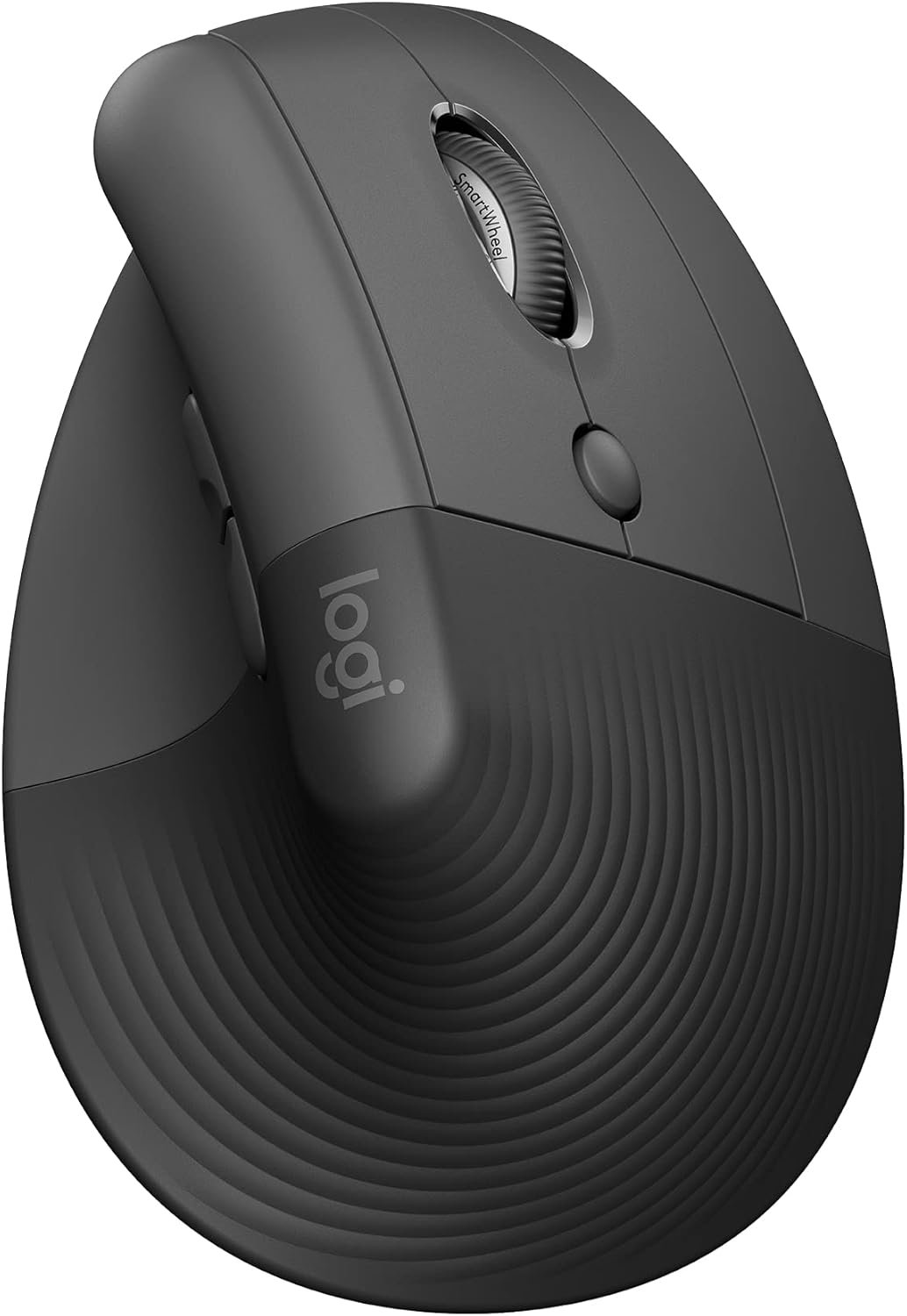
Logitech Lift Vertical Ergonomic Mouse, Wireless Bluetooth or USB Receiver, Quiet Clicks, 4 Buttons, Right Hand Wireless Mouse, Windows/macOS/iPadOS, Laptop, PC – Graphite
$9.99
Related Products




Logitech Lift Vertical Ergonomic Mouse Desk life getting you down? Lift yourself up with the Logitech Vertical Mouse – a comfy and intuitive wireless mouse for PC and Mac crafted specially for small to medium hands. Available in right and left configurations, this Logitech ergonomic mouse features a unique 57-degree angle that elevates your wrist for ergonomic comfort & design, bringing relief to your forearm and upper body. Scrolling feels natural with SmartWheel, offering precision and speed-scroll. Customize your ergonomic Bluetooth mouse with Logi Options+ Software, easily assigning each of the 4 customisable buttons to handy shortcuts as you switch between apps.* Connect with up to 3 devices, using Easy-Switch to toggle between them at the click of a button. Utilize Logitech Flow to move across screens and transfer files with simple commands.* This vertical mouse wireless is multi-OS compatible (Windows, macOS, iPadOS, Chrome OS**, Linux**) and boasts two years of battery life from a single AA***. Product Details: Weight: 125 g; Dimensions: 108 x 70 x 71 mm; Tracking: 4000 DPI (fully adjustable); Battery type: 1x AA; Battery life: 24 months***; Wireless range: 10 m; Connectivity: Bluetooth wireless mouse or Logi Bolt USB receiver; Platform compatibility: Windows 10, 11 or later, macOS 10.15 or later, iPadOS 14 or later, Chrome OS, Linux, Android 8.0 or later**. The ergonomic mouse Logitech ensures seamless functionality on your laptop mouse wireless, USB mouse wireless, or wireless computer mouse needs. *Requires Logi Options+ software, available for Windows and macOS. **Basic functions supported without additional drivers for non-Windows and macOS systems. ***Battery life may vary based on user and computing conditions.
Lift yourself up: When desk work gets you down, lift yourself up with this Logitech Wireless Ergonomic Mouse – a great fit for small to medium right hands
Raise your hand into comfort with this computer mouse wireless: Rest on Lift upright mouse throughout the day with a softly textured grip and snug thumb rest for level-above coziness
57 degrees of soothe: This wireless ergonomic mouse promotes a more natural posture in the forearm for comfort and productivity, for day-long comfort and productivity
Relax into focus: Settle into work with this ergonomic wireless mouse featuring easy-to-reach customizable buttons, whisper-quiet clicks, and a SmartWheel for smooth, seamless scrolling
Ergo-certified: This wireless vertical mouse has been designed, developed, tested, and approved according to criteria set out by leading ergonomists
13 reviews for Logitech Lift Vertical Ergonomic Mouse, Wireless Bluetooth or USB Receiver, Quiet Clicks, 4 Buttons, Right Hand Wireless Mouse, Windows/macOS/iPadOS, Laptop, PC – Graphite
Add a review

$9.99
Alexandra –
Immediate hand and wrist relief. Easy to use
I have been using this mouse for over 4 years for my office job. I personally notice a huge difference with this mouse. I use this mouse to help eliminate overuse or hand pain with a regular mouse.Quality – amazing quality mouse. It lasts a very long time.Feel – this mouse feels like a handshake. It’s immediately comfortable. The mouse does more work navigating a computer than your hand and wrist does.Compatibility – I have used this mouse both with a laptop (MAC & Dell) and an old PC computer. As long as the USB connector is plugged in, it immediately responds and operates.Accuracy – This mouse is very accurate.
Gee Bee –
Easy to Connect, Soft to the Touch, Easy on the Hands
This mouse is fabulous! Perfect size for a woman’s hand (I wear size 7 gloves). It is extremely smooth and has a very soft touch. I have been using it for the past hour and have no hand fatigue. So easy to connect too – no USB connection needed, which is wonderful. Basically you turn it on, point it at the computer and tadah! Contact.Same day delivery too. It arrived a few hours after ordering! Well done.
Aaron –
Best mouse I have ever used!
I have one at work and one at home. This helped my wrist pain so much. It tracks accurately, has a lot of great functions. The build quality is great, and it has USB and bluetooth connection features. It also lets you move from PC to PC automatically with the software! Very neat! You should try this mouse!It took a few hours for my brain to remap with the handshake position, but feels super natural afterwards.
GS –
Best Keyboard and Mouse Combo
This is the best keyboard and mouse combo. The keyboard is very comfortable and the wrist rest is really soft. The vertical mouse is perfect to relieve wrist pain from using a mouse. Highly recommend this set!
dp –
Enjoy using
I’ve had my eye on this mouse for a long time and after Logi’s thumb ball mouse left me disappointed, I picked this one up on a modest sale which any sale at all seems to be rare. So is this the mouse of my dreams? I do notice the difference on my wrist. I still need to use it more to get a good feel for it but so far so good. (Edit: After using it a bit I can say I really like this mouse.) Some complain about gripping and moving the mouse and it is difficult to pick up without repositioning. I solved this by sticking on rubber grips.The L and R are silent. This may be a plus or minus per your preference. 4 and 5 are audible clicks. The mouse wheel click is silent as is scrolling. It doesn’t have L and R wheel side clicks. It does have a programmable button under the wheel. Thankfully it doesn’t require the logi+ software and works right out of the box. Credit to Logitech for that. The last thing I need is more bloatware running in the background.Overall, this is a good mouse for wrist comfort. It’s pricey and won’t be replacing my Venus Pro but I’m sure my wrist will appreciate a break now and then. Oh, and don’t expect much from the packaging. They ship it like manufacturers that cut costs to pass the savings to the customer with a low price point, only they pack it cheap, keep the savings, and chalk it up to the environment.
Babydoc –
Great vertical mouse option
I started a work from home job and the first recommendation was to get a vertical mouse. While this one definitely seems pricey, it is perfect for smaller hands. I would say, as a female my hands are average size for a woman and this mouse fits perfectly. Quality of the mouse is excellent. I have now used this mouse for 3 months and I’m very very happy with it. I’ve had no issues and set up was very easy. Scrolling speed is perfect. I would highly recommend it as an investment piece.
Sam –
Very comfortable
The Logitech Lift Vertical Ergonomic Mouse is a comfortable, well-designed mouse that promotes a natural handshake position to reduce wrist strain during long work sessions. Its smooth performance, dual wireless connectivity (Bluetooth and Logi Bolt), and customizable buttons make it a great choice for everyday use, especially for those with small to medium hands.
Anymuon –
Bad auto driver install. Great mouse. Few of the left hand mfgs.
Really crappy auto driver install. Locked up my USB ports for my usb keyboard, usb mouse, all usb ports in fact. Had to reboot multiple times with an old style 5pin keyboard since the software screwed up my usb ports. All of them. Lucky I have a motherboard with an old style keyboard port. A reboot of W11 in safe mode, ripped out auto-installed software, registry keys and rebooted to regain control of my USB ports. I do not know what went wrong. Alls I know is Logitech loaded something, it locked up my USB ports and I had to rip everything Logitech out to get control again. I downloaded the software, installed it and it worked fine. I’ve had no problems since.I’m an old lefty and as such am ambidextrous in most areas, since there just was not left handed oriented items readily available. You had to have left handed stuff made so you learned to do things right handed. I’ve developed carpal tunnel in both elbows and had purchased a couple of vertical mice, one left and one right. I took the left into work and was looking for a replacement. My other two were around $30 ea. I liked the right handed vertical mouse (Anker). They do not make a left handed version. The left handed mouse is ok, not as good as the Anker. I decided to go above my spend tolerance and get the Logi after reading many reviews. It has not disappointed me. The auto-install sucked. Never letting that happen again.It is a nice smooth mouse. Fine movements that are easily adjustable. The hand position is excellent. I can use this all day without switching to the right because of elbow pain. If you have the pain, you know what I am talking about when it flares. It takes some getting used to the subtlety of the clicks when coming from lower cost mice. Soft and gently like a newborn’s ….One of my big criteria for a vertical mouse is a landing area for the outer two fingers (pinky and next to pinky for finger orientation challenged). When you go to a vertical mouse, it takes some adjustment to moving the mouse since you can’t really press down with your palm and inside two fingers (the ones next to the outside two fingers). It is helpful to be able to use the two outer fingers and thumb to aid in moving the mouse. You have to experience a vertical mouse to understand. The right handed only Anker goes from an inch to a half inch in the length of my pinky below the buttons on the side. This is a really nice landing area for the outside fingers to assist moving the mouse around. You can squeeze a little and the mouse glides. The Logi mouse is a wee shorter than the Anker and the area below the buttons in a mostly straight 3/4″. Both mice curve quickly down to the inside below this area. I was used to a vertical mouse by the time I purchased the Logi and I have no issues with the pinky dragging the table and the finger next to pinky resting on the landing. I move the mouse with no problems. It is the subtlety of how one interacts with these style of mice. The big plus, takes a long time before mouse use causes pain flareups. And this isn’t just a pain and done. Depending on how one ignores the pain, often determines how many days life sucks. The Logi mouse minimizes the flare ups. I’m thinking of taking the Anker in and getting a right handed Logi for home. I like the Anker, I’m frugal and highly recommend it for getting your feet wet. I love the Logi (auto-install sucks) and will probably ignore my frugal tendencies and get a right handed one since I don’t switch hands as frequently with the Logi in the mix. Don’t have to suffer auto-install either.
Mohamed Shereef –
Comfortable mouse, very customizable, I have tested it on different surfaces, and still works very well & smoothly on all surfaces including “plastic & glossy surfaces” :D.
Vishal –
This Vertical Mouse is a game-changer for anyone who values comfort and precision in their workspace. Its unique vertical design positions your hand in a natural handshake posture, instantly reducing wrist strain and tension during long hours of use. The soft, rubberized texture feels secure and comfortable, while the quiet clicks make it ideal for shared or office environments. It connects effortlessly via Bluetooth or the Logi Bolt receiver and works seamlessly across multiple devices. Smooth scrolling, responsive tracking, and reliable battery life round out the experience. Sleek, ergonomic, and thoughtfully designed — this mouse turns everyday computing into a truly comfortable experience.
Siddharth G –
The only and best left handed mouse made by logitech. Quality quality quality product. I would buy this again and again forever if I need to. It surely has made my wrist pain disappear.
Pablo E. –
Lo vi en fisico y me agrado, es muy bien producto, para no sufrir de dolores en la mano con los mouse normales, adicional tiene buena construcción y calidad, es plástico y se siente cómodo en manos de tamaño medio. Lo recomiendo
Randy W Horton –
I am not recommending this mouse for anyone as its so small and very light.