

SABLUTE Large Print Backlit Keyboard, Wired USB Computer Keyboards with 7-Colors Backlight, Wrist Rest, Phone Holder, Oversized Letter Keys Easy to See and Type for Laptop, PC, Windows, Black
$5.99
Related Products




Product description
The video showcases the product in use.The video guides you through product setup.The video compares multiple products.The video shows the product being unpacked. hero-video Merchant Video


1 Generous Wrist Rest
2 Ergonomic Design
3 Phone/Tablet Holder
4 Comfortable Typing
5 Especially nice to people


Upgraded Wired Keyboard
Large Print Keyboard
Wired
Phone/Tablet Holder
Backlight
Multimedia Shortcut
Numeric Keypad
With Mouse
Wired
Phone/Tablet Holder
Backlight
Multimedia Shortcut
Numeric Keypad
With Mouse
Wired
Phone/Tablet Holder
Backlight
Multimedia Shortcut
Numeric Keypad
With Mouse
Wired
Phone/Tablet Holder
Backlight
Multimedia Shortcut
Numeric Keypad
With Mouse
Ergonomic Keyboard 
Keyboard and Mouse Combo 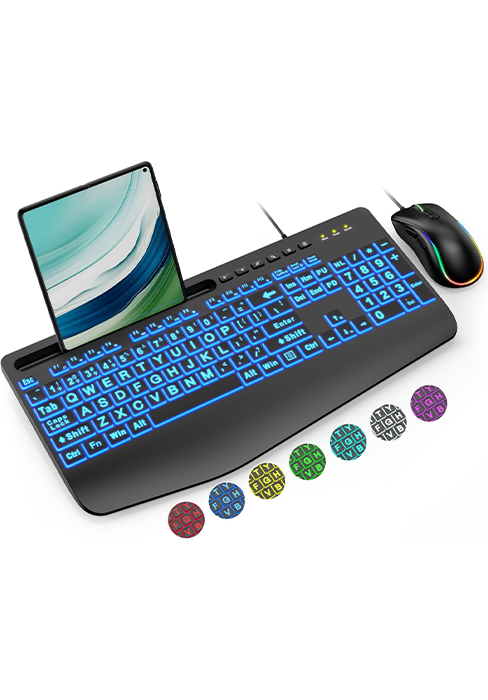
Wired Keyboard 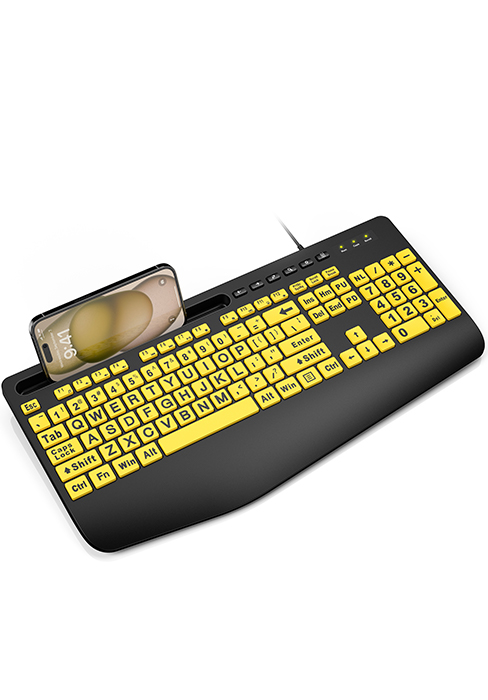
Wired Keyboard 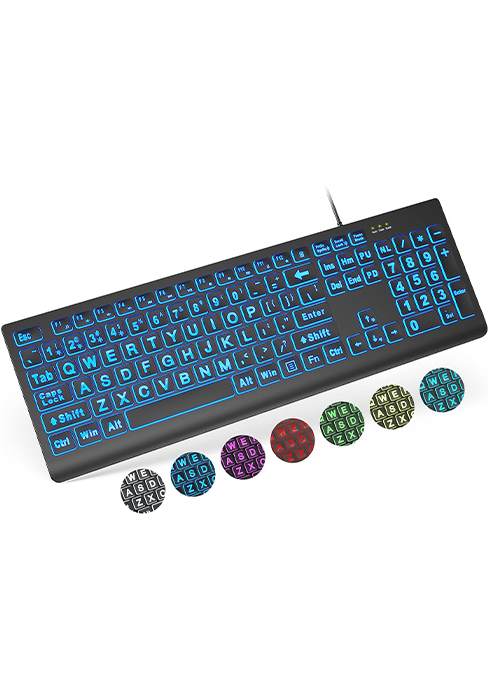
Is it easy to slide when using it?
The bottom of the keyboard has an anti-slip design to ensure it won’t slide on the desktop.
The font of this keyboard seems to be larger than that of ordinary keyboards?
The design of this large font keyboard can display the letters on the keyboard more clearly.
Does the keyboard come with palm rest?
Yes, the keyboard is designed with a palm rest, bottom support, and phone holder to reduce wrist strain and discomfort during extended use.
Can I still see easily and type normally when using the keyboard at night?
Yes, the fonts are large enough and the backlight can be turned on so we can see in dim environments.
Who is a large-print keyboard suitable for?
It’s ideal for seniors, visually impaired users, and anyone needing larger, easier-to-read keys.

Large Print Keyboard: SABLUTE Large Print Backlit Keyboard features an oversized font keys design. Alleviate your eyes, reduce typing errors, ideal for seniors, students, office workers, and those with visual impairments
Wrist Fatigue Relief: The computer keyboard designed with a palm rest, bottom support. Ergonomic keyboard layout reduces wrist fatigue and discomfort during prolonged use
Choose Your Backlight: The Backlit keyboard has 7 levels of brightness and 7 different colors. Backlit can choose to turn on/off and adjust brightness, making it more convenient to type in low-light environments(The lights do not have a memory function!)
Phone and Tablet Holder: It can help you better watch videos, video conferencing, read materials etc. while using your computer. Please note that this holder doesn’t have a charging function
Plug and Play: The wired keyboard does not require batteries or charging, just connect it to a USB port and you can use it directly. The wired setting makes the connection more stable and typing without delay
10 reviews for SABLUTE Large Print Backlit Keyboard, Wired USB Computer Keyboards with 7-Colors Backlight, Wrist Rest, Phone Holder, Oversized Letter Keys Easy to See and Type for Laptop, PC, Windows, Black
Add a review

$5.99
Peggy Darling –
Good quality
I love the large print and the back-lite. I use my keyboard sometimes after my husband is in bed. I used to have to turn my light on in my computer room so that I could see my keyboard. The light really bothered my husband as the bedroom is right next door to our computer room and it would wake him up. Now i can keep the light off since I can easily see my keyboard and thereby work on my computer during the night when I can’t sleep. The color of the light changes which is very pretty.
Babel –
Best USB affordable keyboard with backlight, full size
I love this keyboard as an IT guy. It’s USB, which is more reliable than wireless. It’s useful for ensured BIOS access, as wireless keyboards don’t always allow smooth access to BIOS configuration.This keyboard has a good backlight that doesn’t bother my eyes. The colors can be changed, and there are a few modes, such as breathing color changes or a fixed color.It has large, visible characters that are easy to see in the dark, and it comes with useful extra function buttons for media control and others, such as the calculator.Overall, after trying several expensive wireless keyboards, I have opted for USB for simplicity, and I’ll keep this keyboard, which is good for professional work.Also, it’s silent—you can’t hear much typing. Attached keyboard picture and manual.This is a 100% keyboard, messing full size with num-pad.
Ameera –
Quiet and Customizable
I have bought tons of keyboards and while they all have things I love about them, there was always one or two things that disappointed me. This keyboard shockingly gave me all that I was looking for. It has huge letters I can see that are lit up but best part is the customizing. You don’t have to have it blinking and can leave it a solid color. It’s really easy to figure out. It is quiet yet you feel when you press down on it as if it were a mechanical keyboard. I rarely give reviews unless I truly like a product. For me this is my most favorite keyboard yet. I should’ve done this on my phone to show you a picture. I love my purple keyboard. Big thumbs up.
BFM90 –
Keyboard with backlighting
I recently bought a Lenovo laptop that has a backlighting feature with the keyboard. I wanted this style of keyboard for my Dell desktop. This is a cool keyboard for aging GenX’ers who have trouble seeing the letters with bi-focal contacts, glasses, etc. Previous reviews said the letters don’t light up… but mine do. I can easily see the keys on the keyboard with all lights off, at night time in my home office. Keys are large and easy to see for those who have trouble seeing things up close. Also, this is a full size keyboard with number pad. The keyboard commands for custom backlighting options for changing colors, etc… are easy to use. My only gripe is… I wish custom backlight settings could be saved, so I don’t have to click through commands every time I boot up computer. It only takes a few seconds, which is no big deal. Good price, recommended for 50+ year olds with bi-focal issues.
Linda N –
How to deal with the rotating colors.
I hesitated for awhile to purchase this keyboard due to some of the negative reviews I read, but, ultimately I decided to give it a try and I am glad that I did. It works well, and the keys are easy on the fingers. As for the backlit lighting, I wanted it because I needed to see the keyboard at night. The instructions that come with the keyboard are very confusing however. It took a bit of trial and error, but for the most part the only 2 instructions you need to manage to keep the keyboard one backlit color or to turn off the back lighting altogether are Fn + 2, and Fn + PrtSc SysRq. When the keyboard first starts up each time, the default is rotating all the colors. To choose just one color and keep it on, Just keep slowly hitting Fn +2 until the color your want it to stay on shows up. Then stop. That color will stay on until you either turn off the colors altogether (with Fn + PrtSc SysRq) or turn off the computer. To turn off any colors just hit Fn + PrtSc SysRq.If the keyboard drops dead too soon, I will be back to update my review, but so far, I really like it. It is also nice and light, not like a heavy gaming keyboard.
Stuart M –
Works perfectly. Used backlit keyboards before but the “normal” letters never let enough light through. Even if you’re not old and blind like me you have to try this keyboard. Keystrokes are silent but not spongy so type with confidence. I bought one for my wife as well. We both work from home.
Gabo A. Fulgencio F. –
Desnivelado y las funciones no coinciden con el teclado del lado derecho.
soapmaker –
This is a great keyboard for people who have trouble seeing up close. Also, the wired format is easy to use and more reliable.
Ot –
This is a nicely designed keyboard for those with low vision. The keys have a solid feel. The layout is comfortable and convenient. The two home keys F and J have a small raised mark to give you tactile info for finger placement. As a low vision user, who needs high contrast and bright light to see, my main gripe is that the backlighting is not bright enough for my ease of use. I would have liked a backlight that is two or three times brighter.
DuhBuhYuhG –
Wish I had got this one sooner. It’s quiet and nicely tactile, and the lighting options available are great. The size of the keys makes sense and are have made typing easier and more accurate.