

WD 20TB Elements Desktop External Hard Drive, USB 3.0 drive for plug-and-play storage – WDBWLG0200HBK-NESN
$229.99
Related Products


![[Upgraded] BigBlue 3 USB Ports 28W Solar Charger(5V/4.8A Max), Portable Foldable Solar Panel for Camping, IP44 Waterproof, Compatible with iPhone 11/XS/XS Max/XR/X/8/7, iPad, Samsung Galaxy LG etc.](https://hometech360.co/wp-content/uploads/2025/11/81YnxzTVGL._AC_SL1500_.jpg)


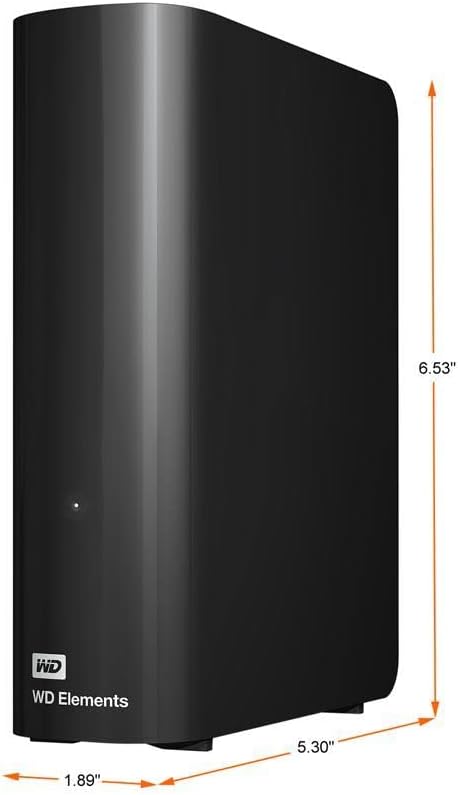


WD Elements desktop HDD storage with USB 3.0 offers reliable, high-capacity, add-on storage, fast data transfer rates, and universal connectivity with USB 3.0 and USB 2.0 devices.
High-capacity add-on storage.Compatibility : Windows 10 plus, Reformatting required for use with MacOS.
Fast data transfers
Plug-and-play ready for Windows PCs
WD quality inside and out
13 reviews for WD 20TB Elements Desktop External Hard Drive, USB 3.0 drive for plug-and-play storage – WDBWLG0200HBK-NESN
Show all
Most Helpful
Highest Rating
Lowest Rating
Add a review

WD 20TB Elements Desktop External Hard Drive, USB 3.0 drive for plug-and-play storage – WDBWLG0200HBK-NESN
$229.99
Jodi –
Nice product
I got this to download all my photos to from my computer to free up space and it works great and has lots of storage space
Mort Green –
WD 2TB Elements Portable External Hard Drive
Reliable and fast. Compact design, easy to use, and works flawlessly for backups and extra storage.
DROD –
Very good External Hardrive. Plug and PLay
Great for Back up. Replaced an old external HD with this one. This one is quieter and loads faster. I got it for a great price on sale.
Larry –
Great External HDD
Super nice external drive. Fast and no issues. Super quiet as well.
Dave Wright –
5 TB of Space so You Can Stop Deleting Things… Eventually
So you wanted storage. Lots of it. You wanted to keep every photo, every movie you said you’d watch “later,” and every game you’ll probably uninstall in two weeks anyway. Enter this WD Elements 5 TB drive — your digital hoarding companion.What it offers:Five terabytes. Yep, 5 TB. That’s enough to fill with backup after backup of backups. Reviewers report it hits around 100–135 MB/s for large sequential transfers.GadgetsGenes+3Happy TechFam+3Review Finder+3Plug‑and‑play simplicity: Just USB it, and you’re off (on a Micro‑B connector, because apparently USB‑C is still optional).Happy TechFam+1Great value: At one point the 5 TB version dropped to ~$89, making it one of the more affordable “massive storage” options.Tom’s HardwareLightweight and portable enough to toss in your bag. Reviewers like the portability.GadgetsGenes+1What you don’t get (and what you’ll be forced to accept with a sigh):It’s still a mechanical hard drive. That means spinning parts, slower speeds especially when dealing with lots of small files, and vulnerability to drops. Reviewers measured write speeds around 80–100 MB/s or less in some tests.Techwatch.de+2Review Finder+2No fancy extras: No hardware encryption, no bundled high‑end file‐management software, no USB‑C (in the standard model). If you were hoping for premium features, you’ll feel that absence.GadgetsGenes+1Mixed reliability feedback. Some users swear it works flawlessly; others report failures within a couple of years, especially if handled roughly.ProductReview.com.au+2Reddit+2My summary in plain English (with a side of sarcasm):If you’re looking for a “put‑it‑in‑a‑drawer and never think about it” backup device, this is a great pick. It gives you lots of space for not lots of money.If, however, you’re planning on using it for mission‑critical data (like 10 years of family archives), expecting SSD‑speeds, or you’re planning to travel with it and subject it to being tossed in a backpack with your laptop and coffee tumbler — well, maybe temper the expectations. Don’t rely on it as the only copy of anything.Final verdict:Buy it if you need capacity and want a simple solution. Treat it with respect (i.e., don’t drop it, plug it into a USB‑3 port, remember: backup your backup).Expect it to get the job done, but don’t expect miracles.
Kevin T. –
Very satisfied
Easy setup and works perfectly right out of the box. I have had no issues. Great drive for backing up my photos.
Humanoid –
These are Server/Enterprise Quality Drives
Product: Western Digital 14TB Elements Desktop External Hard DriveThis is a bargain, especially if you pick it up during a good sale (I paid $170). The real value comes from the fact that these are not merely consumer grade hard drives. They are server/enterprise quality. Inside the enclosure is a 3.5″ platter, helium filled hard drive. The model inside my enclosure is WD140EDGZ. These drives are much more expensive if bought bare (no enclosure). They are perfect for shucking (removing the bare drive and using in a desktop). See photo of the bare 3.5″ drive post-shuck.I ran diagnostics and everything was perfect. No complaints so far. I picked up a handful of these and plan to use them in a file server. If you want a very good and reliable HD, this one is a steal (especially if shucked).
Trusty Dusty Tries New Things –
What integrity counts, it has to be WD
I work with hundreds of hard drives per year. I also recover data from hard drives, so I have a decent idea of what we’re dealing with here. To put it bluntly, all consumer level hard drives are not great, but WD (Which bought out Hitachi Storage) is simply the best. It’s why they cost more, and it’s worth every cent. I’ve had brand new Seagate drives dead, right out of the 20-count boxes we get.Speed wise, I am not really sure how fast these are compared to other brands, but with SSDs, I view hard drives as a cheap/slow storage space. And 1 TB is a LOT of data if you think about it. I’m writing this on the 14TB drive, but that can be hundreds of thousands of pictures for example. So the real question is “What would you do if you lost them all?”Take it from me, it is always “When” is it going to die and not “if”. The drive will fail, no matter what. So you should always have a backup drive. If this is your backup drive, then you’re all set. If this is your “main” drive, then consider buying a second, even if the second one is a Seagate – point being you are covered when the main one breaks.I have taken these apart before (Not the more modern very large ones) and those drives did work as internal drives, but I would hesitate to do that simply because you’re probably going to trash your warrantee when you try and return a case that has a bunch of broken tabs (The cases for these elements drives are terrible and fall apart when you try to take them apart).My drive shipped with a rather small power brick, which was a nice touch. I think the cable length was something like 5 feet, so it’s not a super short cord. Used the USB to connect to a Windows 11 laptop and it found the drive right away without any issues at all. If you use this as a permanent drive, e.g. a home network share, then you can go into Windows Device Manager and switch the drive type to include caching which speeds up the drive a bit (At the expense of data loss if you do not eject the drive before you yank the plug).If data integrity is essential, then for consumers, I would recommend the Red series drives as they are made for home network storage units. For corporate, the Enterprise drives (Which are usually SAS and not SATA) are the way to go. Of course none of those are USB drives, but I’m throwing this out there in case you have the option of going with an internal drive.At the end of the day though, like I started with, data integrity is the most important thing for me, and it doesn’t get better than Western Digital.
Luis Rivera Vazquez –
Gran capacidad y calidad 100% recomendado
CHRISTIAN –
o hdd é muito bom, silencioso e rápido
Mark AfterDark –
I recently purchased the WD 4TB Elements Portable USB 3.0 High Capacity Hard Drive and I am extremely satisfied with my purchase. The drive is compact and easy to use – just plug it into my computer’s USB port and I’m good to go. The 4TB of storage is more than enough for my needs, and the transfer speeds are reasonable for a standard 5400rpm HDD..One thing that initially concerned me was the drive’s tendency to get hot during use. However, I have used it extensively over the past few weeks and have not experienced any issues with overheating.In terms of value, I believe the WD 4TB Elements Portable USB 3.0 High Capacity Hard Drive offers excellent value for the price and the high capacity and decent transfer speeds make it well worth the investment. If you need a lot of storage on the go and are looking for a reliable and high-performance option, I highly recommend the WD 4TB Elements Portable USB 3.0 High Capacity Hard Drive.
Eveline van Meer –
Functions super!
Dhirendra –
This is a great hard drive. I previously had a 1 TB hard drive of WD and that worked really fine. That is why I decided to go for a 2TB hard drive of WD. Though, Seagate hard drives are much better than WD because they are thinner and they sustain for a long time like WD.I purchased it @Rs. 5599.Pros-1. WD is a very reliable name in the field of hard drives. So it is reliable.2. 2-year warranty.3. small in size.4. Reading speed is amazing. I got around 150 MBps/ 1.2 Mbps while reading. (Data was a movie and USB port was USB 3.0)5. Writing speed is also great. I got around 55 MBps/ 440 Mbps while writing on the hard drive. (Data was a movie and USB port was USB 3.0)6. The speed of reading and writing on USB 2.0 ports is also great.7. USB 3.0 cable is already included in the package. So you don’t need to purchase a USB 3.0 cable separately.8. The length of the cable is enough for normal usage.9. The product is original. So you can get is registered on WD website. You will also get your warranty from there.10. Cheaper than Seagate models. (in general)Cons-1. If you are in need of a long USB 3.0 cable then you will be disappointed. The length of the cable is just enough for normal usage.2. The hard drive is somewhat thick. You will get a Seagate hard drive of the same capacity to be slimmer.Final comment- If the price is not a big issue for you and you want a slimmer hard drive then go for Seagate hard drive. Else this is certainly one of the best choices.