
RK ROYAL KLUDGE S108 Typewriter Keyboard, Retro Mechanical Gaming Keyboard Wired 108 Keys with RGB Backlit Sidelight, Detachable Wrist Rest, Round Keycaps Blue Switches – Black
$59.99
Related Products


Product description

Note: S108 may need to be ‘woken up’ after computer boots by hitting some keys several times.
Fix the problem through this firmware: bit.ly/RKS108Fix

Clicky Mechanical Blue Switches
Mechanical blue switch for ultimate gaming performance. The mechanical keys offer medium resistance, audible click sound & tactile feedback. PS: The switches are not swappable.

Collapsible Wrist Rest
The ergonomic ABS wrist pad provides firm support that alleviates pressure on your wrist from gaming or typing at an elevated angle.

All 108 Keys Anti-Ghosting
N-key rollover. It allows you to press multiple keys at a time to execute intricate moves with precision. No delay, no error.

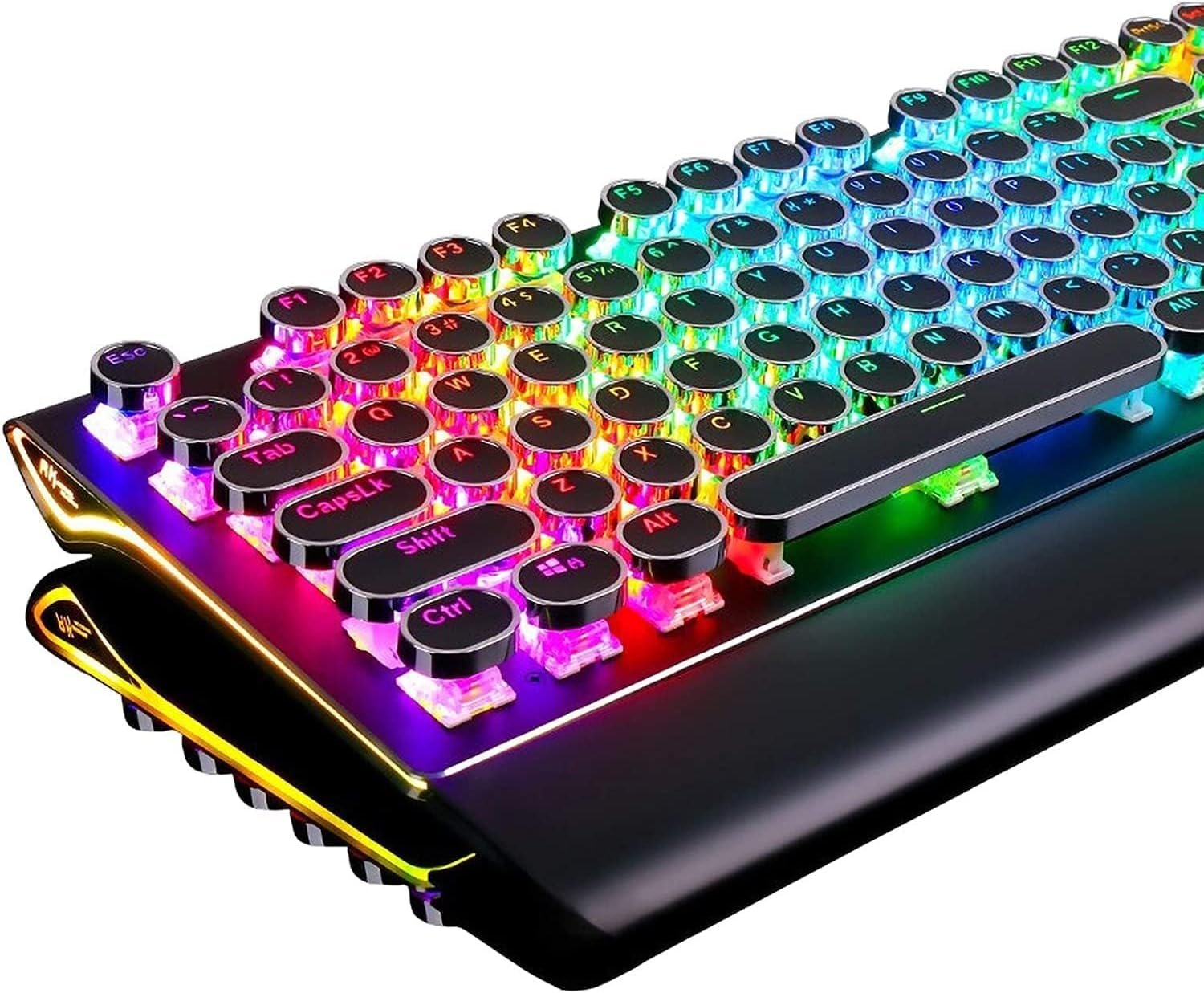
Retro Typewriter Style Round Keycaps
With vintage steampunk round keycaps looks like a old school fashion typewriter, brings you comfortable typing feeling & stable clicking touch.

True RGB Backlit
Up to 168 RGB backlit modes and 7-color sidelight. Press “Fn+Pause” to change the global backlight color, supports solid color and RGB color.
How to reset the keyboard:
Fn+Esc: Press and hold for 3 seconds

3 Wire Trunking Design
In order to adapt to different usage scenarios, the three-cable slot design allows USB cables to be arranged in various directions, eliminating desktop clutter and keeping the workspace neat.

 Convenient Shortcuts:
Fn+F1: My ComputerFn+F2: BrowserFn+F3: Calculator, Fn+F4: MusicFn+F5: Previous, Fn+F6: Play/PauseFn+F7: Next, Fn+F8: StopFn+F9: Search, Fn+F10: FavoriteFn+F11: None, Fn+F12: EmailFn+Win: Win Key Lock/Unlock
Typewriter Style Mechanical Gaming Keyboard with True RGB Backlit
Shortcuts You Should Know Before Getting in the colorful world:
1.Pick up a keyboard backlight effect:
Fn+Del: Dynamic effects; Fn+Ins: Interactive effects;
Fn+Home: Breathing effect;
Fn+PgUp: Switch the stars/7-color gradient backlight
2.Select the color:
Fn+Pause: Switch Global backlight color;
Fn+ScLk: Switch the interactive part color (Only work for interactive backlight effects)
3.Brightness and Lighting Speed:
Fn+”→”/”←”: Lighting speed ; Fn+”↑”/”↓”: Lighting brightness
4.Sidelight: Fn+PgDn (Dynamic Effect and light OFF included)
How to Customize the Backlight: 1. Press Fn+1 to start customize mode. 2. Press Fn+F11 to start recording the LED lights of backlight (The Caps, Win and Scrlk keys are flashing) 3. Press any key by any need to LED ON/OFF. Press same key multiple times to change color. 4. Press Fn+F11 again to save it. (The Caps, Win and Scrlk keys stop flashing) 5. Press Fn+1 switch to the customized backlight. Ps: When keys are shorted, they may stay light up.
Specification
Dimension 440*182*42mm, 17.4*7.2*1.6in Net Weight 0.9kg, 1.98lb Backlit Lighting Effects 168 lighting effects Dynamic Sidelight Rim 7 lighting effects Number of Keys 108 keys Switch blue switch Switch Lifespan >50 million Actuation Force 60gf±5gf Keystroke Travel 2.0mm Keycaps double-shot injection molded Connection wired USB USB Cable Length 1.8m, 70.9in Voltage 5V Current 200mA
Add to Cart
Add to Cart
Add to Cart
Add to Cart
Customer Reviews
4.5 out of 5 stars 7,319
4.2 out of 5 stars 8
4.6 out of 5 stars 519
4.6 out of 5 stars 645
Price
$59.99$59.99 $69.99$69.99 $59.99$59.99 $64.99$64.99
Switches
Blue Switches Blue Switches Cream Switches Cream Switches
Connectivity Technology
Wired Wired Triple Mode Triple Mode
Number of Keys
108 108 65 75
Vol Knob
no data
✓
✓
✓
Battery Display
no data
no data
✓
no data
Retro Typewriter Style with Mechanical Keys: Mechanical blue switches offer medium resistance, audible click sound & tactile feedback, provides responsive and precise gaming environment and performance. Vintage steampunk keyboard round keycaps looks like a classical typewriter, brings you comfortable typing feeling & stable clicking touch.
Unique RGB Backlit Light Up Keyboard: Featuring dynamic colorful Per-Key Illumination, up to 168 LED backlit modes, Dynamically adjusting color changing. This RGB mechanical keyboard has customizable transparent sidelight for an immersive gaming atmosphere. You can also adjust the rainbow keyboard backlit brightness and speed. Moreover, you can create customized backlight as needed.
Detachable Wrist Rest & Metal Panel: The ergonomic ABS palm rest provides firm support that alleviates pressure on your wrist from gaming at an elevated angle.The gaming mechanical keyboard panel was made of top-grade aluminium alloy material, with matte-finish texture, sturdy and robust enough to protect it from scratch.
108-Key Anti-Ghosting: 108 keys full size keyboard with number pad, and all keys non-conflict. Every keystroke is registered during intense gameplay and fast typing, no matter how many other keys are pressed at the same time. Clicky keyboard let you enjoy high-grade game with fast response.
PC Gaming Keyboard Compatibilty: Support PC Mac Laptop, Tablet, Desktop computer, compatible with Windows 7/8/10/XP/Vista, Linux and Mac OS systems. Plug and play. No drivers are required. Universal Keycaps Compatibility: Seamlessly swap between vintage typewriter keycaps and standard keycaps for a unique and versatile typing experience, catering to your individual style and preferences.
8 reviews for RK ROYAL KLUDGE S108 Typewriter Keyboard, Retro Mechanical Gaming Keyboard Wired 108 Keys with RGB Backlit Sidelight, Detachable Wrist Rest, Round Keycaps Blue Switches – Black
Add a review

$59.99
GK –
Great, unique, and very bright keyboard
I was a little hesitant to purchase this keyboard after reading the reviews, especially considering the frequent mention of typing difficulty with the keys on the keyboard. I mean it looked great, but the whole purpose of a keyboard is typing on it and if it poses problems in that area, it could be a real deal-breaker.I went ahead and ordered it anyway because it just looked so cool. After receiving it, I plugged it in and, with a little trepidation, began typing on it. I found that getting accustomed to the keys was a very minor concern. In fact, I would not even consider it an issue at all. I think it caused me to hit another key in addition to the one I was typing once or twice; however, I’m not a great at keyboarding, so it could very well have been me. On the best keyboards, I use the backspace key quite frequently. At the same time, I have had training in using a keyboard and can type without the hunt and peck method. It helps that this keyboard also has a little raised line on the F and J keys so you can get the correct hand placement without looking. I think the thing that throws people off is not the size of the keys as much as the feel. Because they are circular, with a raised edge around the outside of the key, they feel different underneath your fingers, so it takes a little getting used to in that respect. It’s a bit of a distraction at first.It has a generous six feet of cord, which is usually ample for most setups. The cord also has a hook and loop strip which keeps the cord together when not in use. The cord is not braided, but it should hold up under regular use.The video for this keyboard was taken under very bright lighting and the RGB colors show very well. I purchased this for my work office, where I have bright lighting, so this was a big plus. Upon plugging in a second time, it remembered my RGB settings I had on it before it was unplugged.I read a lot of reviews that mention the audible click for the Cherry red mechanical keys. While certainly different than a non-mechanical keyboard, when I began typing on this keyboard, I really did not notice the sound until I was writing the review, and what had been said by other reviewers called my attention to it. The switches I have on my keyboard for my home computer are mechanical Cherry brown, and I did not notice a lot of difference in the loudness of the sound. In fact, for an office environment, even with others around, I don’t think it would be that much of an issue, unless of course a co-worker has misophonia, then any keyboard would probably be difficult for them to tolerate.Overall, I really like this keyboard. It is very bright and has a lot of onboard color options. There are a lot of RGB keyboards that can be had for cheaper, but as the saying goes, you get what you pay for, and in this instance, I am happy with what I had paid for. Not having disappointments is worth something in itself.ADDENDUMAfter further typing with this keyboard, I decided to amend my review. I still really like it, but there is a little getting used to the keyboard before one is comfortable with it.Since the space of the keys took up more space than the keyboard I replaced, on the vertical plane anyway, I figured that the size of the keys could not be the problem. If anything, they were spaced further apart than a regular keyboard. So, I began to think of other factors that might affect the feel of this keyboard.First, I tried folding a couple of pieces of paper and raising the wrist rest by about 1/8 of an inch. This seemed to help, but it still wasn’t where I wanted to be. I finally got somewhere very close to perfect when I folded the attached wrist rest under the keyboard, took my 3/4-inch-high traditional wrist rest, set it about ½” inch to an inch from the keyboard, and put the feet on the top of the keyboard down so the top is elevated. That pretty much did the trick, though there will probably be a little tweaking I’ll do along the way. It still takes a little getting used to; however, the change in hand positioning has made so much difference.After some experimentation, I believe that the awkward feel of the keyboard was not due to the size of the keys as some reviewers had said. In fact, as I mentioned, the keys took up more space on the keyboard than the keyboard I was using. If anything, the keys were spaced a little too far apart. I think this is because they are round and do not fit together like square keys.But, after doing some trying of different things, I think what I found was a way to successfully type with much less adjustment of style or a learning curve. For me, it has much more to do with my hand position in relation to the keyboard than the keyboard itself.Furthermore, I think the provided wrist rest is too low and too close to the keyboard for optimal functioning.So, for me, I think the best answer was to use a traditional wrist rest and have the back legs of the keyboard extended. That seemed to provide a more natural position for my hands in typing. With a little help from AutoCorrect, and the occasional gratuitous use of the backspace key, I was flying across the keyboard in no time.If you purchase this keyboard, which I would recommend, I encourage you to try some experimentation yourself and find what works best for you.
Shawn P. Miller –
Super easy to use
This keyboard works great. I like the revolving color scheme. I also enjoy the retro old school typewriter look to the keyboard. While it took my fingers a bit to adjust to round keys as opposed to the standard square keys on a regular keyboard, once I did, I found this keyboard easy and more comfortable to use. In addition, it looks like it should be super easy to keep clean. The keys aren’t recessed down into the board like on a standard keyboard, so if you needed to use some canned air to blow out dust or crumbs or what not, it’ll be much easier to do than on a regular keyboard.
DNT –
Lighting and macro shortcuts here
Before I get to the review, I wanted to share instructions that I found to program the lighting the way you’d like – the included instructions are not super clear (or complete), my only real complaint about this keyboard.FN+F11 — custom color settingPress FN and a number row key (1, 2, etc.) to choose which “saved config” you want. Then Press FN-F11 to engage recording mode. All four indicator lights will be blinking. Press each key to toggle through 7 available colors. When you are finished, press FN-11 to save. In the future, press FN-1, FN-2 etc. to pull up the saved config.FN-F12 — custom macro. You can set macro to up to 5 of the following keys: Y U I O P. Press FN-12 to start programming, press one of the FN keys to record macros into that, then type your macro, then FN-F12 again to end recording. In the future, call up the macro by FN+Y (etc.).Other keys: Most of these are obvious based on the secondary legend, FN-F1 is multimedia, FN-F2 is play/pause, FN-F3 is stop, FN+F4 = vol + FN+F5 is VOL -, and FN-F6 is mute.FN+PRTSC is full color modeFN+SCRLK is single color modeFN+PAUSE is toggle among 5 modes: single key highlight, scroll, wave, raindrop, reactive typing (to be explained later)FN-DEL — main region (36 key) backlight on/offFN-END — water flow lighting modeFN-INS — reactive lightsFN-HOME– breathing light modeFN-PGUP — always on / offFN-PGDN — side/back light controlFN – LEFT or RIGHT — adjust speedFN – UP or DOWN — adjust brightness (3 steps)To “factory reset” the keyboard, press FN+ESC and hold for five seconds.FN+WIN is winkey lock toggleFN-INSERT — interactive mode toggle among four modes:Mode 1) press a key, and it changes color to the color you selected, and slowly transitions back to the background color. For example, you had keyboard set to blue, special color set to red. You press a key, key turns red, then slowly fades back to blue.Use FN-SCRLCK to change the selected color.Use FN-PAUSE to change the “background color”Use FN-LEFT/RIGHT to adjust the length of time it takes to fade backUse FN-UP/DOWN to adjust lighting brightinessMode 2) Propagate — from the key pressed, light spreads outward in circle (may be back lights?)use FN-PRTSCN to adjust key and FN+SCRLCK to adjust background colorsUse FN+arrows as above3) Wave mode same as 2) except it’s the keyboard lights. Side lights are on full.4) Reacting typing, normally blue. Based on how fast you type keyboard slowly transitions to red based on speed.FN-HOME — full keyboard “breathing mode”use FN-PRTSCN to engage full color mode or FN-SCRLCK for single color, adjust brightness and speed as needed.FN-PGUP full keyboard light onagain, use FN-PRTSCN (cycle through colors) and/or FN-SCRLCK as well as brightness and speedFN-END — press once for left to right, again for right to left, use same keys as before.FN-PGDN — side/back light controlDefault is slow transition of all colors use FN-PRTSCN and FN-SCRLCK as needed, as well as FN-arrows.Review:I wanted a full size keyboard, with round keys, that was backlit and could be set to a single backlight color, and not stuck on RGB mode. This keyboard checks all the boxes, and has a ton of customization options as well!I got the blue switches, but I’ve seen this offered with red switches too, in case you’re looking for something quieter, or less tactile.I love the retro futuristic typewriter look! I’ve set mine up with a solid yellow backlight, with a wave pattern that ripples out from each key pressed. You can change all of the effect colors as well, including the ripple color (see the attached video).There are a ton of different modes and color options here, and none of the customization requires software to set up – it’s all done with key combos. This is a plus in my opinion.I have seen a link for customization software available for this keyboard, supplied by the seller in the customer questions section of this page on Amazon, but I’m using this with Linux and Mac computers, so I won’t have a chance to test it out.I have been using round keys exclusively on my last two keyboards – I find I type faster on them, measured with a typing test comparing a sqaure key Vs. round key keyboard that were otherwise comparable.While slim, this is a full size, 108 key keyboard, with a numpad, and it takes up space on your desk. The keyboard is solid too, with some good weight to it. There’s a little more spacing between the keys than you might find on many other keyboards, and this may take some getting used to. I’m a big fan of the footprint personally, and feel like I have a spaceship command deck in front of me!I’ve had this a keyboard for a day, and just had to review it, it’s that cool. I’ll update this review after putting this keyboard through it’s paces over the next few weeks.
Nicole K. –
I had this keyboard now for quite some time. I still love it.I always wanted a typewrite styled keyboard but with a more modern touch. This is it.The round keys take some time to get used to as they are a little more sensitive.I already kinda broke a bit of the silver part on the space key, but nothing a little glue cannot fix.
Shari –
Bought this as a Christmas present, so won’t really get to test it for a bit, but it looks awesome. Not bought for the gaming functions, but more as a cool present for a writer.While the packaging wasn’t the best to protect the keyboard during shipping, it arrived almost two weeks early.The lighting is amazing and seems the perfect brightness, even in a dark room. After reading some of the reviews, I was concerned the keyboard sounds may be too loud. But they’re noticeable without bearing over powering. I think this is a great item.
Dereck –
I’m not tech savvy at all but I like this thing, colours are very neat , lots of different settings, very glad I bought it, like a old typewriter but space age lol
Pet –
The keyboard its self is great and and i have little bad to say other than it takes quite some time to get used to cause of the circular buttons and the sensitive keys you. Also you can have many different colours and effects on it however it is supposed to be programmable through . the software link however the link takes you to a folder of which is empty and u cant find software for the s108 on the Rk website.
POINT DEXTER –
Its best mechanical keyboard of owned.I love it