

TP-Link Deco BE25 Dual-Band BE5000 WiFi 7 Mesh Wi-Fi System | 4-Stream 5 Gbps, 240 Mhz | Covers up to 6,600 Sq.Ft | 2X 2.5G Ports Wired Backhaul | VPN,MLO, AI-Roaming, HomeShield, 3-Pack
$28.99
Related Products


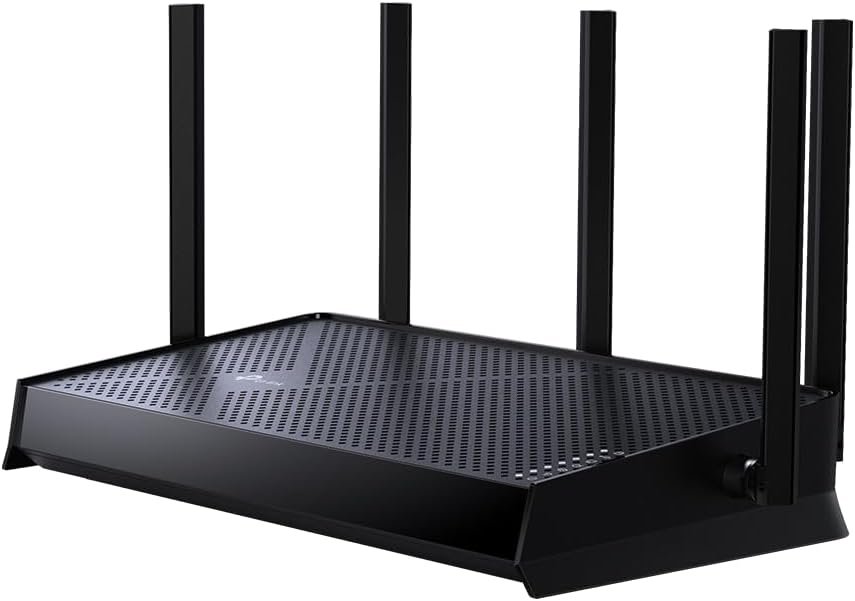


Fast, Reliable WiFi 7—Everywhere You Need It.
Future-proof your home with the Deco BE25, a 3-pack Wi-Fi 7 BE5000 mesh system that delivers fast, reliable coverage throughout your entire home—up to 6,600 sq. ft. With cutting-edge Wi-Fi 7 Multi-Link Operation (MLO) technology, 240 MHz channels, 4K-QAM, and support for over 150 connected devices, the Deco BE25 provides exceptional dual-band Wi-Fi speeds of up to 5Gbps.†△
This means you can enjoy seamless streaming, lag-free gaming, and smooth connections for all your smart home devices. Experience warp-speed connectivity with two ultra-fast 2.5 Gbps WAN/LAN ports in each Deco unit. AI-Roaming adapts to your needs using advanced algorithms, ensuring seamless connections even in hard-to-reach corners of your home. Upgrade to the Deco BE25 and embrace the future of Wi-Fi!
𝐒𝐮𝐩𝐞𝐫𝐜𝐡𝐚𝐫𝐠𝐞𝐝 𝐰𝐢𝐭𝐡 𝟒-𝐒𝐭𝐫𝐞𝐚𝐦 𝐃𝐮𝐚𝐥-𝐁𝐚𝐧𝐝 𝐖𝐢𝐅𝐢 𝟕 𝐮𝐩 𝐭𝐨 𝟓 𝐆𝐛𝐩𝐬 – Achieve full speeds of up to 4324 Mbps on the 5GHz band and 688 Mbps on the 2.4GHz band with 4 streams. Experience incredible performance⌂△ with Multi-Link Operation (MLO), 4K-QAM and Multi-RUs. Ideal for maximizing the capabilities of your latest WiFi 7 devices, including the 𝙣𝙚𝙬𝙚𝙨𝙩 𝙞𝙋𝙝𝙤𝙣𝙚 and gaming consoles.
𝐒𝐭𝐫𝐨𝐧𝐠 𝐌𝐞𝐬𝐡 𝐂𝐨𝐯𝐞𝐫𝐚𝐠𝐞 𝐃𝐞𝐯𝐢𝐜𝐞 𝐂𝐚𝐩𝐚𝐜𝐢𝐭𝐲 – Cover seamless WiFi coverage up to 6,600 sq. ft. With 4 high-gain antennas and 4 high-power FEMs as well as support over 150 devices without compromising performance, the Deco BE25 provides far-reaching, reliable signals for stronger connections.
𝟐 𝐱 𝟐.𝟓𝐆 𝐖𝐀𝐍/𝐋𝐀𝐍 𝐏𝐨𝐫𝐭𝐬 𝐰/ 𝐖𝐢𝐫𝐞𝐝 𝐁𝐚𝐜𝐤𝐡𝐚𝐮𝐥 – Each Deco unit is equipped with two 2.5 Gbps WAN/LAN ports, offering warp-speed connectivity for high-performance wired devices and multi-gig internet services.§ Through TP-Link’s self-developed technology, the Deco BE25 supports simultaneous wireless and wired backhaul, combined with Wi-Fi 7 MLO resulting in broader, more stable connections.
𝐎𝐮𝐫 𝐂𝐲𝐛𝐞𝐫𝐬𝐞𝐜𝐮𝐫𝐢𝐭𝐲 𝐂𝐨𝐦𝐦𝐢𝐭𝐦𝐞𝐧𝐭 – TP-Link is a signatory of the U.S. Cybersecurity and Infrastructure Security Agency’s (CISA) Secure-by-Design pledge. This device is designed, built, and maintained, with advanced security as a core requirement.
𝐀𝐈-𝐃𝐫𝐢𝐯𝐞𝐧 𝐒𝐞𝐚𝐦𝐥𝐞𝐬𝐬 𝐑𝐨𝐚𝐦𝐢𝐧𝐠 – The Deco Mesh creates a unified network with a single network name. Uses AI-Roaming technology for seamless streaming and optimal speeds, adapting through advanced algorithms and self-learning as you move throughout your home.
𝐓𝐏-𝐋𝐢𝐧𝐤 𝐇𝐨𝐦𝐞𝐒𝐡𝐢𝐞𝐥𝐝 – TP-Link’s premium security service keeps your home network safe with cutting-edge network and IoT protection. Free features: 1. Basic Network Security including Security Scan and IoT Device Identification 2. Basic Parental Controls 3. Quality of Service 4. Basic Weekly/Monthly Reports. Visit TP-Link website for more information.
𝐕𝐏𝐍 𝐂𝐥𝐢𝐞𝐧𝐭𝐬 𝐚𝐧𝐝 𝐒𝐞𝐫𝐯𝐞𝐫 𝐒𝐮𝐩𝐩𝐨𝐫𝐭𝐞𝐝 – Enables home devices to access remote VPN servers without installing VPN software on each device. Supports simultaneous VPN and regular internet connections for enhanced security and flexibility.
𝐄𝐱𝐭𝐞𝐧𝐬𝐢𝐯𝐞 𝐂𝐨𝐦𝐩𝐚𝐭𝐢𝐛𝐢𝐥𝐢𝐭𝐲 – TP-Link Deco products are extensively compatible and can work together to form a Mesh Wi-Fi network. It is also backward compatible with all WiFi generations and works with any internet service provider (a modem is required for most internet service providers).
𝐕𝐨𝐢𝐜𝐞 𝐂𝐨𝐧𝐭𝐫𝐨𝐥 – Control Deco BE25 using voice commands with Amazon Alexa or Google Assistant-enabled devices.
9 reviews for TP-Link Deco BE25 Dual-Band BE5000 WiFi 7 Mesh Wi-Fi System | 4-Stream 5 Gbps, 240 Mhz | Covers up to 6,600 Sq.Ft | 2X 2.5G Ports Wired Backhaul | VPN,MLO, AI-Roaming, HomeShield, 3-Pack
Add a review

$28.99
Sara Pacheco R –
⭐️ Excellent coverage and consistently strong performance
I live in a two-story home and always struggled with dead zones, especially in the rooms farthest from the router and in the backyard. Since installing this device, the WiFi now reaches the entire 2,500 sq. ft. area without any issues — and even a bit beyond that.Overall, this TP-Link is absolutely worth the investment. If you’re looking to extend your coverage, improve stability, and eliminate dead zones, this model is a great choice. I would definitely buy it again.Setup was incredibly easy. The TP-Link app walks you through every step, and I had everything up and running in under 10 minutes. I really like that the system automatically manages the best band for each device, switching between 2.4 GHz and 5 GHz seamlessly. You never notice it happen, but the network stays stable at all times.The speed improvement has been significant. Before, I dealt with buffering while streaming movies or constant cutouts during video calls. Now I can have multiple devices connected — TVs, laptops, phones, and smart home gadgets — and the network doesn’t slow down. Even during peak usage hours, everything runs smoothly.Overall, this TP-Link is absolutely worth the investment. If you’re looking to extend your coverage, improve stability, and eliminate dead zones, this model is a great choice. I would definitely buy it again.
Nikesh Koirala –
Good router
Had to deal with a faulty unit. Assuming that is a one off issue, here is my review:It is easy to connect and range is good. The setup is straight forward and once the main unit is setup, the rest of them are super easy. The speed is also good. My internet connection is 100 mbps up and 20 mbps down and I am getting over that on wifi. So, that is awesome. The only downside is I have a Tplink router with easymesh and I found out even though it has easymesh on it, this deco is not compatible with archer series tplink router. So, that is something people should check. Just because the device has easymesh may not be compatible. Other than that, good powerful router
Canon Shooter –
Works, and easy, but not perfect, firmware mystery
I ordered one set of these, that was used-New. It set up fine, except for one node, that had issues. Finally got that node to boot, and upgraded firmware – from 1.0.17 to 1.0.20. But alas, a couple days later, that node dropped again, entering a perpetual boot loop. So I set about to return the “used” set.Ordered a new set instead. This set came with firmware 1.0.23. Interesting. If you visit the tp-link web site, 1.0.17 is still listed as the most recent.I put the one of the new nodes on the network. Set it to be the new “main” node, and the system moved everything over. VERY convenient!!!! I had spent time naming every device as I connected them, so was not looking forward to doing that again, but did not have to.Our of curiosity, I looked to do an update. But the system said everything was on the most up to date firmware – version 20. Even though the new main was actually on 23.So summary. Used system had a bad node (probably why it was returned).New system worked very very well.Knocking off two stars, because of the firmware issues. Web site says 17 is most recent. Used system found and updated to version 20. New system shipped with 23. And the datestame for v. 23 is Jul 31st (it is now Oct as I write this). So not like 23 came out in the 2-3 days I had the used system operational. And why is the web site still showing 17????? I did find on the website that hardware version 1 (both the used and new are US hardware v 1.6) does have the version 20 for download on the web site. Perhaps the v. 17 should not have updated to 20??? Regardless, 23 is nowhere to be found, but is what I am running. Not a fan of firmware update packs not being uniform in download, or automatic updates, certainly not after 4 months have gone by!!!!!!
guy c –
App NG, reviewed both models purchased, X55, & AXE5400 (3 packs)
04/05/2023: First I would recommend yo FIRST i WOULD RECOMMEND THAT YOU PURCHASE DIFFERENT COMPANY ROUTER.Pros: Nice looking, delivered in a box. Streaming has had no issues unless the TiVo Ethernet is working.My broadband speed is at 200MBS, When I had 400, I got 3, when I got 3, I got 2, guess what I get now?between 20-147 MBPS. Now I use Speedtest.net by ookla ( for years)I was reluctant to install a Mesh system being the 2.4ghz requirements for accessories. But I had an Archer C10, with about 65 connections and I looked one day and saw 20 was the number then suggested. Surprisingly it worked for several years. I only bought the Mesh when I saw how many connections it would support.So I set up the guest network as a dedicated 2.4ghz. Now every time I run a scan or network optimization it tells me that my guest network is enabled and should be disabled.Like you will see below, the system is very flawed. If you travel and leave your home to automation your time away will be ruined. It may show something off that’s on but since it shows off you can’t see it.One of the worst things is items constantly being dropped are outdoor lights ( in the soffit so still under 15-20ft. from any Deco, the other being Ring Cameras. Now my main concern first about the cameras is if a ring camera goes off line the camera actually blinks a white/blue light indicating you aren’t on line. So If I am a thief and looking at blocks and I see a camera blinking and the same the next day I would think nobody’s home because usually it would be re-connected. When a outdoor light ( not always the same one)is not working is just another indicator of an issue.I would say simple install which it mostly is except when you have to reboot or update firmware and the Deco’s (X55) reboot one doesn’t go green. ( waited 3 hours) so i went to that Deco and it has 3 Ethernet connections so I unplug the connections and remove and reinsert the power cable it finally goes green and I plug in the cables, it goes red again but after a few minutes it went green. ( right before I unplugged it again).My home is two stories and a basement. it is approx. 2000 sq ft of interior usable space. I have a Deco in the three rooms upstairs(1 XE pro 75 and 2 X55), (not in the bathroom) and two on the main floor at both ends of the house1&1 and another in the basement(XE75Pro)1/29/23 Crap. Don’t bother to change the Deco descriptions to what the item actually is because it will drop them, change the name to a generic HS103 (tp- link plug)or Ring camera(s) or exterior lighting.this 9am I had 71 clients with about 10 not renamed. This evening I had 45 clients, from there I went to the item, blocked it, then unblocked it (it refreshes sometimes) NG. I turned off power to the lights and back on and I’m missing 6 of 10. I’m missing 5 Ring cameras , and 5 tp link mini plug not on any deco not on any block list and not on the complete network connection table. By 7pm nothing changed. 1.5 out of 5 stars App NG, Drops clients, changes names items)Reviewed in the United States 🇺🇸 on January 11, 2023Style: AXE5400 Pro, 3-packVerified Purchasethe app is inaccurate. the deco drop off. If you change the name like I did to know what is what and then it gets dropped and LOSES THE NAME. So I have to go back to the MAC id of the item to rename the device only to reset immediately, a few minutes after, and hours later as well. when things go “off line” which is difficult for power outlets as they are powered. Cams Ring get dropped and do not connect back, you have to go the the list of “offline” and clear the items and THEN they re-connect. Some of the items that drop do re-connect but those are hardwired and its beyond me how a computer plugged in can go off line.You might think I have a huge house, its about 2000sq of living space. I have three of these and three X55 deco as well so you see I’m running six and it drops my doorbell 12 feet away from the deco or access point ( Netgear Nighthawk set to AP mode for 2.4)it does go through a wall consisting of sheetrock, wood 2×4″s ( 1957) plywood, tarpaper, and vinyl siding. and doorbell. The previous Archer C50 ( for 20 connections) I have over 70 at all times so I decided to upgrade. So far I’m mixed because the amount of time, placing, testing, naming, I have spent many hours looking at what is happening. I can work around an app that basically sucks for anything really necessary if the errors were consistent but they are not and therefore UNRELIABLE. I bought at Christmas so I Have until 1/31 to return and I will, I will also order another set of both to see if it’s the units but I don’t think so. Perhaps I will order the BE33000 in March and see if its any better as I can do another return cycle if the replacements don’t improve the quality of the device. If you are looking for an APP that is important to you , don’t buy theseYou also cannot specify a Deco for a WiFi item. it connects, but it connects to Decos that it connects to even though the AXE are backhauled and the A55 are hardwired to the network as well.So you can block it and unblock it and see if it connects to the Deco in the same room or another part of the house.Another annoying thing is it shows for my Ring cameras, my TP-Link mini plugs, and two Echo’s as hardwired. If anyone can find an Ethernet port on my camera & plugs you are better than me.
abdulkareem alsaeefan –
Keeps disconnecting from the . unstable operation. I returned 2 of them, got stuck with one because I lost the box.
Andy –
Much better than my BT extenders!! Was easy to set up and install and the network is much more stable now. Was recommended by a friend and can’t fault the mesh network!!
Mohamed –
كنت بعاني من ضعف اشارة الوايفاي بالمنزل لما اكون بعيد من الراوتر، ومنتج الـDeco X55 حل هذه المشكلة بكل جدارة. المنزل بالكامل الان اصبحت اشارة الوايفاي 2.4G/5G تغطيه وبسرعات ممتازة بل حتى خارج المنزل صارت توصل اشارة الوايفاي! يستحق كل ريال.
Alejandro –
Estaba dudando si usar o no una red mesh, pero realmente fue una gran decisión, el x55 me sirvió perfecto compré el nodo en buena oferta y me solucionó mis problemas de conexión, automáticamente se habilitó el protocolo wifi 6 y ahora lo puedo usar tanto para mi computadora de trabajo como para la de jugar, celulares, Alexa, cualquier cosaEs una maravilla la app, lo recomiendo para México, si tienen Telmex con fibra óptica, les va a cambiar mucho la conexión
Gibran –
He venido empleando desde la pandemia productos de 2 y 4 antenas, los tipicos rompemuros de Steren y la verdad no tienen nada que ver con este producto en el sentido de instalación, estabilidad y cobertura. Debido a mis necesidades, confundí la cobertura con la velocidad de internet contratada, al ver que no llegaba a todos los rincones de la casa incremente la velocidad del contrato de internet y seguía el problema en las habitaciones mas alejadas del modem (mi casa es de 110 m2 de construcción y de dos plantas, el modem esta en la esquina de la planta baja). Teniendo una velocidad de 200 mbps pegado al modem, en la segunda planta en el otro extremo del modem medía 8 mbps y con oscilaciones. Adquirí el paquete de dos antenas de este producto, uno de ellos lo conecté con cable ethernet al modem y el otro lo puse en la segunda planta, en el centro de la casa, con lo que recibí 190-200 mbps en toda la casa. Y me di cuenta que para mis necesidades está sobrado por lo que solicite bajar la velocidad de contrato a 100 mbps que me resultan excelentes para mi contrato de 4k de Netflix y para las tabletas de los niños (juegos y videollamadas), para el internet de trabajo, etc. Solo puedo decir que ya ni me acuerdo de ese tema porque todo funciona a la perfección. Lo recomiendo mucho.